Being a student in 2026 can sometimes feel like having 15 tabs open in your brain.
There’s a lecture you didn’t understand.
An assignment due tomorrow.
A presentation that still looks terrible.
A huge PDF you haven’t started reading.
And then there’s the question: “Which AI tool should I actually use?”
That’s where things get confusing.
There are hundreds of AI tools promising to make students smarter, faster and more productive. But you don’t need hundreds of them. You probably don’t even need ten.
You just need a few tools that solve real problems.
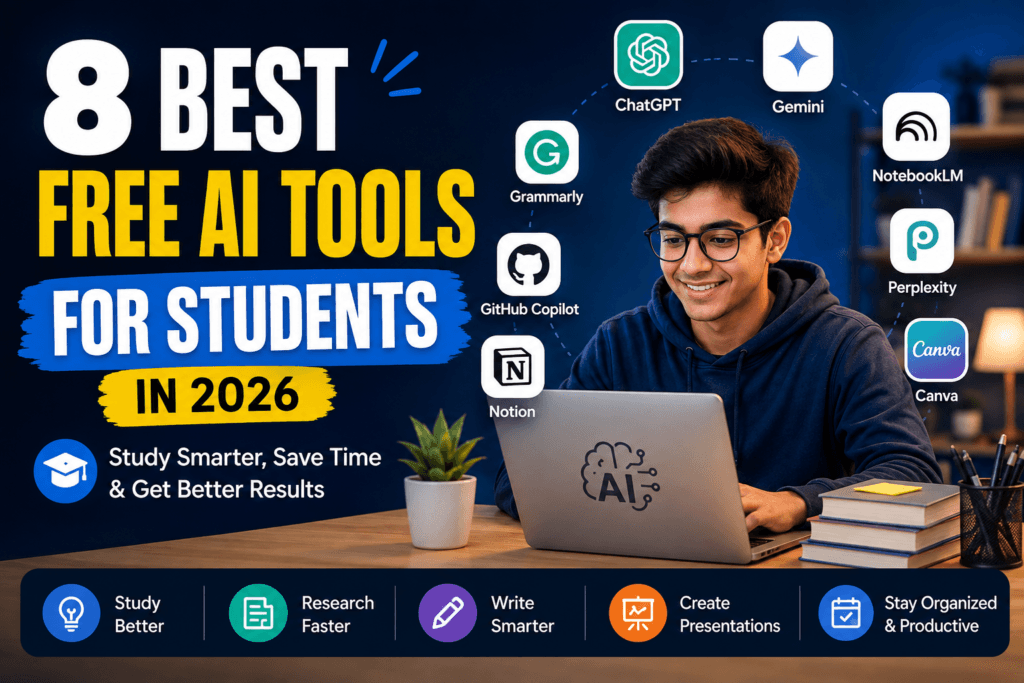
So instead of throwing a huge list of random AI websites at you, we’ve picked eight tools that can actually fit into a student’s everyday workflow — from understanding difficult topics to researching, writing, creating presentations and organizing study material.
One important note before we start: “free” doesn’t always mean unlimited. Many AI services have free tiers with usage limits, and those limits can change over time.
## The 8 AI tools worth knowing
| Tool | Best for | Free option |
|—|—|—|
| ChatGPT | General study help | Yes |
| Google Gemini | Learning & everyday AI help | Yes |
| NotebookLM | PDFs, notes & study material | Yes |
| Perplexity | Research | Yes |
| Canva | Presentations & visual projects | Yes |
| Grammarly | Writing improvement | Yes |
| GitHub Copilot | Coding | Yes / student benefits |
| Notion | Notes & organization | Yes, with AI limits |
Let’s look at what each one is actually good for.
## 1. ChatGPT — Best all-rounder for students
If you only want to start with one AI tool, ChatGPT is probably the easiest place to begin.
You can use it for much more than simply asking questions.
Stuck on a difficult chapter?
Ask it to explain the concept in simpler language.
Preparing for an exam?
Ask it to create practice questions.
Writing an email to a professor?
Ask it to improve the wording while keeping your original meaning.
The trick is not to ask vague questions.
Instead of:
“Explain economics.”
Try:
“Explain inflation like I’m learning it for the first time. Give me a simple real-life example and then ask me five questions to check whether I understood it.”
That small change can make the output much more useful.
ChatGPT’s free tier currently includes web search, file and image uploads, data analysis and other capabilities, although usage limits apply and can change. 1
**Best for:** explanations, brainstorming, study help, writing and practice.
**Good starting point if:** you don’t want to learn five different AI tools.
## 2. Google Gemini — Great if you already use Google
If your student life already revolves around Google, Gemini is worth having in your toolkit.
You can use it for learning, writing, planning, brainstorming and other everyday tasks.
One practical use is revision planning.
For example, you could give it your exam dates and chapters and ask:
“Create a 10-day revision plan. Give me daily targets, one short revision session and five practice questions for each day.”
Google continues to add learning-focused features to Gemini, including tools designed around personalized learning and practice. 2
**Best for:** everyday AI assistance, learning and planning.
**Good starting point if:** you already use Google’s ecosystem heavily.
## 3. NotebookLM — Probably the most useful tool for your PDFs
This is the one I’d recommend trying if your Downloads folder is full of lecture PDFs.
NotebookLM is designed around the sources you provide, which makes it particularly useful when you want to study from your own material rather than get a generic answer from the internet.
Imagine you have a 70-page lecture PDF.
Instead of reading everything immediately, you can use the material as the basis for questions, summaries and revision.
For example:
“Create 20 exam-style questions from these notes. Keep the questions based on the uploaded material.”
That’s a much more useful workflow than simply asking an AI:
“Tell me everything about this subject.”
**Best for:** lecture notes, PDFs, source-based study and revision.
**Good starting point if:** your study material is already available digitally.
## 4. Perplexity — Best when you need to research something
Sometimes you don’t want an AI to simply explain something.
You want to **find information**.
That’s where Perplexity can be useful.
Its free Standard plan currently provides practically unlimited basic searches, along with limited access to more advanced search features and file uploads. 3
This makes it useful for:
– college projects
– topic research
– finding sources
– comparing information
– getting a starting point for further reading
But there’s one habit worth developing:
**Don’t stop at the AI answer.**
Open the sources.
Read the original information.
Then decide what you actually want to use.
That’s especially important for academic work.
**Best for:** research and finding sources quickly.
**Good starting point if:** you’re constantly searching the web for projects and assignments.
## 5. Canva — Best for presentations that don’t look boring
Not every student problem needs a chatbot.
Sometimes you just need to make a presentation that doesn’t look like it came straight from a 2005 PowerPoint template.
That’s where Canva helps.
You can use it for:
– presentations
– posters
– infographics
– project covers
– social media graphics
– visual study material
Canva also has AI-powered features, although the exact AI allowances depend on the plan and can change. 4
The important part is not to let AI do everything.
Use it to get started.
Then edit the design yourself.
Your presentation should still look like something you understand and can confidently explain.
**Best for:** presentations and visual projects.
**Good starting point if:** your assignments involve slides, posters or graphics.
## 6. Grammarly — Useful when your writing sounds “almost right”
You know that feeling when you write an email and keep reading it because something sounds weird?
Grammarly can help with that.
It can help identify grammar, spelling and writing issues and make your writing clearer.
For students, that can be useful for:
– emails
– assignments
– reports
– applications
– essays
– English-language writing
But here’s a tip:
Don’t blindly accept every suggested rewrite.
Your writing should still sound like you.
**Best for:** grammar and clearer writing.
**Good starting point if:** English isn’t your strongest writing language or you frequently write formal messages.
## 7. GitHub Copilot — A useful one for coding students
If you’re studying computer science, software development or programming, this one deserves a place on the list.
GitHub Copilot can provide AI-powered coding assistance inside supported development environments.
There is currently a Copilot Free plan with limited usage, while verified students can access the Copilot Student plan with additional benefits. 5
It can be useful for things like:
– understanding unfamiliar code
– generating code suggestions
– debugging
– explaining programming concepts
– getting unstuck when learning a new language
But don’t use it as a substitute for learning to code.
If Copilot writes something for you, take the time to understand what it actually did.
**Best for:** programming and coding students.
**Good starting point if:** you’re learning development and regularly get stuck on code.
## 8. Notion — Best for getting your student life organised
Here’s a problem that has nothing to do with intelligence.
Disorganisation.
Your notes are in one place.
Your assignment deadlines are somewhere else.
Your project ideas are in WhatsApp.
And your exam timetable is probably a screenshot buried somewhere in your gallery.
Notion can bring notes, tasks, databases and planning into one workspace.
Its Free plan is available for individuals and includes core workspace features, while AI functionality on free/plus plans has usage limitations or trial access depending on the feature. 6
You could use it for:
– subject notes
– assignment tracking
– exam planning
– project management
– personal study dashboards
**Best for:** organization and productivity.
**Good starting point if:** you constantly forget where you saved something.
# So, which AI tool should you actually use?
Here’s the part that matters.
**Don’t download all eight today.**
You’ll probably end up spending more time testing AI tools than studying.
Instead, choose based on your problem.
### If you need an AI study assistant
**Start with ChatGPT.**
### If you study mainly from PDFs and lecture notes
**Try NotebookLM.**
### If you’re doing research
**Try Perplexity.**
### If you make presentations
**Try Canva.**
### If your writing needs improvement
**Try Grammarly.**
### If you’re learning programming
**Try GitHub Copilot.**
### If your notes and deadlines are a mess
**Try Notion.**
### If you want another general-purpose AI assistant
**Try Gemini.**
# My simple 3-tool student setup
If I were starting from zero, I wouldn’t pay for eight subscriptions.
I’d start with:
**ChatGPT + NotebookLM + Canva**
Why?
ChatGPT can help you understand and work through problems.
NotebookLM can help you work with your own study material.
Canva can turn your ideas into a presentation or visual project.
That’s already enough to cover a surprisingly large part of a student’s daily workflow.
Then add another tool only when you actually have a reason for it.
# One thing AI still can’t do for you
It can’t decide whether something is actually correct just because it sounds confident.
AI tools can make mistakes.
They can misunderstand questions.
They can produce outdated information.
And they can sometimes give you an answer that looks perfect until you check it.
For assignments, research and anything important, verify the information and check the original sources.
And if your school or college has rules about AI-generated work, follow them.
The best use of AI isn’t:
**”Do my work for me.”**
It’s:
**”Help me understand, improve and finish my work better.”**
# Final verdict
You don’t need a giant collection of AI apps to become a more productive student.
You need the **right tool for the right problem**.
For general study help, ChatGPT and Gemini are good places to start.
For your own notes and PDFs, NotebookLM is especially useful.
For research, Perplexity is worth trying.
Canva and Grammarly solve completely different problems, while GitHub Copilot is a much better fit for coding students.
And if your biggest problem is simply keeping everything organised, Notion may be more useful than another chatbot.
Start with one or two.
Use them properly.
Then decide whether you actually need more.
That’s a much better AI strategy than collecting 50 tools you’ll forget about next week.
—
### Affiliate Disclosure
Some links on GoEAI Tools, AI for Students, Free AI Tools, Student Productivity, AI Tools 2026arnWithAI may be affiliate links. If you purchase a product or sign up for an eligible service through one of these links, we may earn a commission at no additional cost to you.
Our recommendations are based on usefulness, features, availability and the type of user the tool is suitable for. Affiliate relationships do not determine our editorial recommendations.